⚠️ Ting Voice is currently in limited release. If you're not part of the early access group, this article won't apply to you.
Take control of your incoming calls
Call screening lets you choose how calls are handled before your phone even rings. Want to block anonymous callers? Send VIPs to your mobile? Make certain calls ring differently? With Ting Voice, you can do all of that and more.
You can set up call screening either from your phone using star codes or directly in the Ting Voice Portal.
Call screening from your phone (star codes)
Call screening from your phone (star codes): Use these codes to quickly set preferences for different caller types.
Code
What it does
How to do it
*77
Block anonymous callers
Dial *77 to send anonymous calls to a busy tone
*87
Allow anonymous callers
Dial *87 to turn off anonymous call blocking
*95
Block anonymous callers with message
Dial *95 to play a message to anonymous callers
*97
Unblock message-based blocking
Dial *97 to stop playing a message to anonymous callers
*59
Allow a specific number
Dial *59, enter voicemail PIN, then the 10-digit number (starting with 1)
*60
Block a specific number
Dial *60, enter voicemail PIN, then the 10-digit number (starting with 1)
*58
Block a number with message
Dial *58 to block a number and play a message
*63
Forward a specific number
Dial *63 after setting a “Forward To” number in your Ting Voice Portal
*64
Block all other callers
Dial *64 to block everyone not in your call rules
*74
Allow all other callers
Dial *74 to allow everyone not in your call rules
*57
Call trace
Dial *57 right after a call to mark it in your call history
*78
Do Not Disturb: On
Dial *78 to send all calls to voicemail
*79
Do Not Disturb: Off
Dial *79 to resume normal ringing
Call screening in the Ting Voice Portal
Prefer a visual setup? You can manage call screening at the user level or for the entire account.
To screen calls for a specific user:
Go to Account.
Select Business Cloud.
Click on Users.
Click a user to expand settings.
Go to Calls.
Select Call Screening.
Choose a screening behavior from the dropdown.
To screen calls for the full account:
Go to Account.
Select Settings.
Click on General.
Under Account Call Screening, choose behaviors for each category.
Click Save at the bottom.
Call screening fields explained
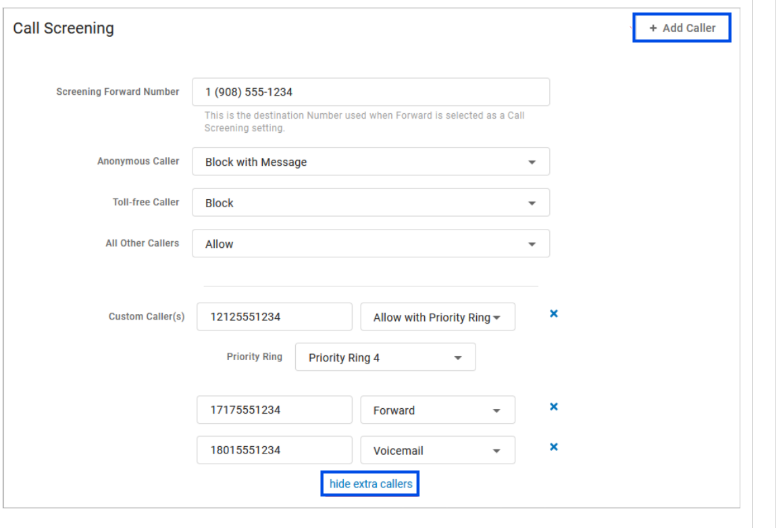
+Add Caller Starts the process of setting up call screening behaviors.
Screening Forward Number The destination number is used when a call screening category is set to Forward.
Anonymous Caller Choose what happens to incoming calls that don't send caller ID.
Toll-Free Caller Choose what happens to incoming calls from a toll-free number.
All Other Callers Choose what happens to all incoming calls unless otherwise defined by a custom rule.
Custom Callers Define the screening behavior for a specific phone number.
Call screening behavior options
For any caller type, you can choose:
Allow: Rings through normally
Allow with Priority Ring: Rings differently (choose ringtone)
Block: No ring; caller hears busy tone
Block with Message: “The number you’ve dialed is not accepting calls”
Forward: Send to another number (you must set this first)