Help center
Contact Us
Help center
Contact Us

Help Center - Internet

Account and Billing

Updating your Ting Account details
Other Articles in this Section
Viewing your Ting Internet Bill and History
Prev
2 / 2

Updating your Ting Account details

In this article
Updating your details

Need to change the name, email, or phone number on your Ting account? No problem–updating your account details is quick and easy.

Updating your details

1. Log in to your Ting account.

2. Click My account in the top-right corner.

3. Select Account Settings.
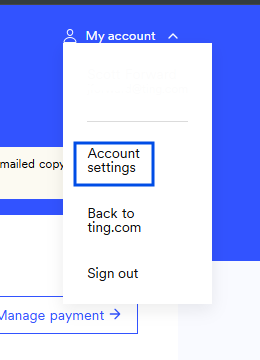
4. Under Account details, update your name, email, or phone number.
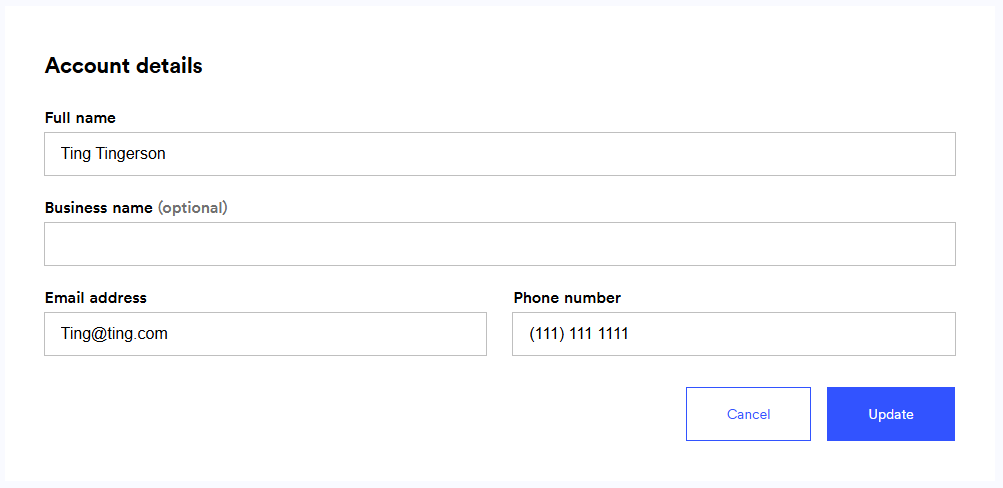
5. Click Update to save your changes.

Other Articles in this Section
Viewing your Ting Internet Bill and History
Previous
2 / 2
  • Ting Internet
  • Ting Internet Status
  • Ting Mobile
  • Privacy
  • Terms