Help center
Contact Us
Help center
Contact Us

Help Center - Mobile

Account Management

Your Ting mobile account experience
Articles in this section
Your Ting mobile account overview
How do I know which Ting SIM I am using?
Viewing your usage history
Activating dual SIMs on Ting
Setting up additional lines on your Ting Account
Updating your Ting account information
How do I add a nickname to my devices?
How do I remove a line from my account?
Updating your communication preferences
Transferring your number out of Ting
Resetting your Ting Mobile password
Suspending your Ting Mobile number
Next
1 / 2

Your Ting mobile account experience

In this article

Two experiences, one Ting!Why are there separate experiences?Quick Tip: Not sure where to login?

We’re building something better : A new Ting Mobile account experience.

We’re in the middle of rolling out a new Ting Mobile experience. That means, while we complete the stages of this change, you may see a different set of instructions or guides for your account, login on a different website page, or some features may look a little different than others.

And don't worry - you’re not missing anything. Each experience provides the same service, customer support and features you love.

Two experiences, one Ting!

Not sure which account or login screen you should use? Here's the details for each experience:

Accounts created on Ting.com

If you signed up for Mobile using ting.com, you’ll see the new account experience.

What that means for you:

  • Signing into your account? Use Ting.com to login and view or manage your account.
  • If you also have Ting Internet, you'll be able to manage all your services in one place.
  • A new, updated and refreshed account design.
  • You'll still get access to the same core features.

Accounts created on Tingmobile.com

If your account was created before the new experience rolled out, for now, you’ll continue to see your original experience.

What that means for you:

  • Continue using Tingmobile.com to sign in to your Ting Mobile account.
  • The same core features you love and rely on will remain available.
  • There are no changes to how you activate lines or manage your Mobile service.
  • We'll provide updates when we're ready to move your account to the new experience.

Why are there separate experiences?

Moving every account to a new system isn’t something we rush, and for a good reason.

We’re taking a gradual approach so we can:

  • Give you the best experience and support.
  • Avoid disruptions to your account.
  • Provide notice ahead of time, so you know when to expect changes.

What to expect when we update your experience

We won't just update your account overnight and leave you wondering what happened.
  • We'll provide notice of the changes coming ahead of time.
  • You'll be provided information on where to login, and any actions to take, if necessary.
  • We'll also provide resources on how to navigate the new experience. 

Quick Tip: Not sure where to login?

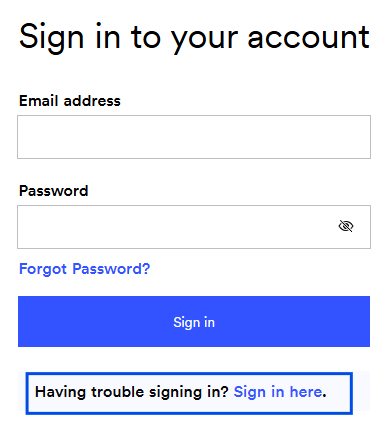
If you land on Ting.com or Tingmobile.com and are unsure if you're in the right spot - try logging in! If you get an error, chances are you'll need to switch to the other site.

On the login interface for either site, you'll see an option for Having trouble signing in? Sign in here under the sign-in form. Use this to bring you to the other account experience login.

‍

Other Articles in this Section
Your Ting mobile account overview
How do I know which Ting SIM I am using?
Viewing your usage history
Activating dual SIMs on Ting
Setting up additional lines on your Ting Account
Updating your Ting account information
How do I add a nickname to my devices?
How do I remove a line from my account?
Updating your communication preferences
Transferring your number out of Ting
Resetting your Ting Mobile password
Suspending your Ting Mobile number
Next
1 / 2
  • Ting Internet
  • Ting Internet Status
  • Ting Mobile
  • Privacy
  • Terms