Help center
Contact Us
Help center
Contact Us

Help Center - Internet

Troubleshooting Internet

Checking for Service Outages in your Area
Other Articles in this Section
Troubleshooting your Ting Fiber Connection
Troubleshooting your eero device
Troubleshooting Streaming Issues with Ting Internet
Ting Internet Hardware Warranty
Opting Out of Service Text Messages
Improving Router Performance
Troubleshooting Internet Browser Error Messages

Checking for Service Outages in your Area

In this article
Why service outages happenChecking for a Service OutageSigning up for Outage AlertsStill offline, but no outage reported?
No one likes being offline.

That’s why we monitor all Ting services 24/7. If there’s ever a disruption, we’ll post real-time updates to our status page so you’re never left wondering what’s going on.

✉️ Planned Maintenance: We’ll always give you a heads-up by email if there’s scheduled work in your area.

Why service outages happen

We know service outages are frustrating. Our goal is always to keep you connected and to get you back online as quickly as possible when things go down. To fix an outage fast, we first need to figure out what’s causing it. Here are some common reasons your service might be interrupted:

  • Network disruptions
    These can be caused by damage to physical infrastructure–things like storms, earthquakes, power outages, or cut cables.
  • Scheduled maintenance
    Sometimes we need to take things offline briefly for upgrades or repairs. We do our best to schedule maintenance during low-usage times and will provide you with communication before planned maintenance happens.
  • Technical issues
    Equipment malfunctions, server errors, or software bugs can also cause temporary service interruptions.

We’re always working behind the scenes to minimize downtime and we’ll keep you in the loop if there’s a known issue in your area.

Checking for a Service Outage

We'll update the Ting Status page whenever there is an outage or to provide alerts for Scheduled maintenance.
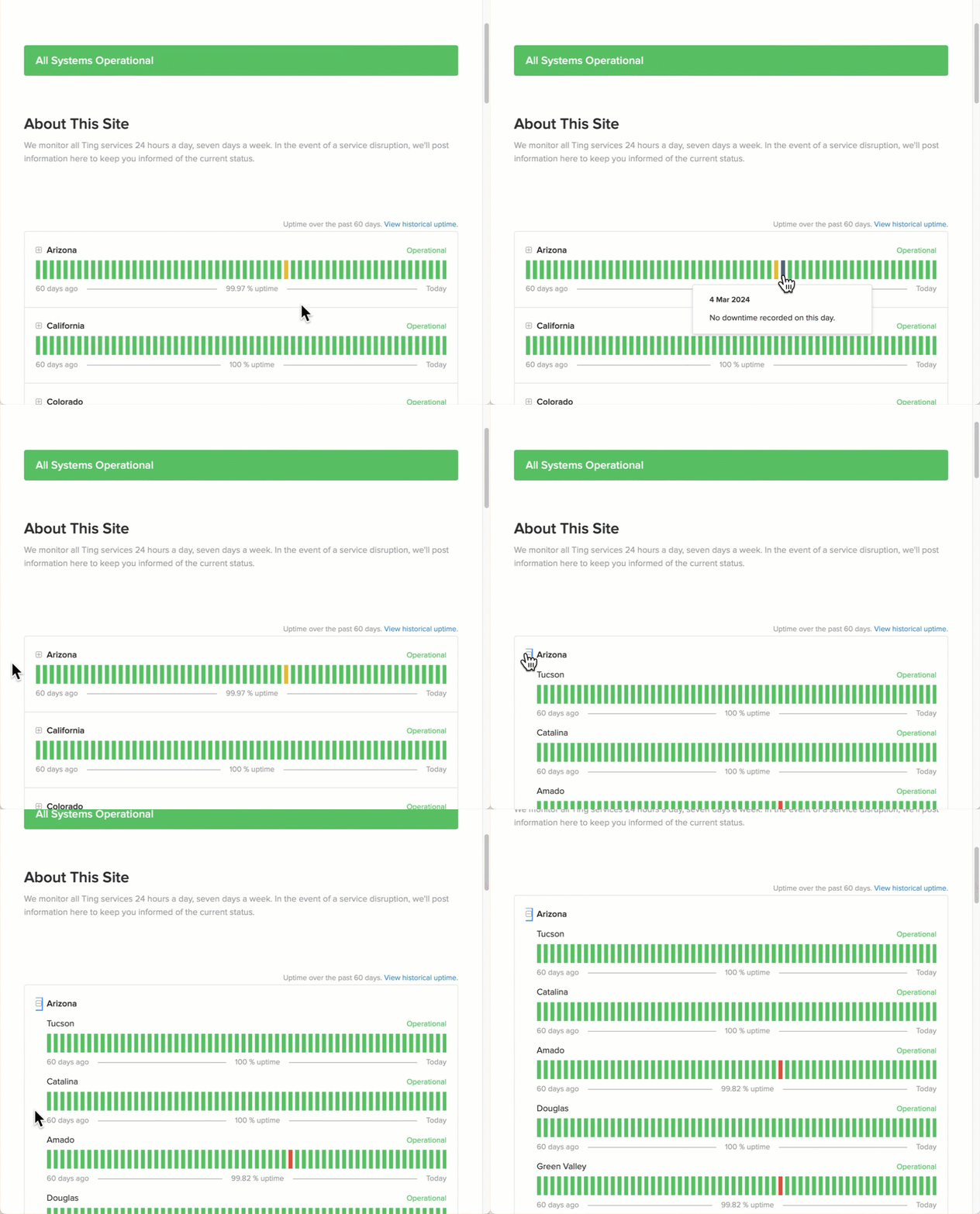
  1. Open the status page.
  2. Locate your state.
  3. Click the + (plus sign) next to your state to expand the list.
  4. Look for your city.
  5. Hover over the lines to view the status. Each line represents one day. Each color represents a status.
  6. Clicking on a line will bring up more details about specific Ting towns within your region.

‍

‍

What do the colors indicate?

🟩 Green = No issues

🟧 Orange = Partial outage

🟥 Red = Major outage

Signing up for Outage Alerts

We recommend signing up for updates from Ting Internet Outages.

This ensures you receive real-time communications on the status of any outage and repairs to service in your area. No need to call in – you can choose to get alerts right to your email or phone.

  1. Open the Status Page.
  2. At the top right-hand corner of the page, click Subscribe to updates‍
  3. Choose your preferred method of subscription - email, text message (SMS), Slack, or RSS feed by clicking the corresponding icons.

📌 When you subscribe, we'll only send notifications about outage alerts.

Still offline, but no outage reported?

If there's no outage posted but you're still offline, try these steps:

1. Check your setup

Make sure your equipment is plugged in and working. Need help? Troubleshoot your Ting Fiber connection.

2. Check your billing

Sometimes payments fail due to expired or replaced cards. Update your payment method to resume service.

3.  No service still?

Contact Us. We’re happy to take a closer look.

Other Articles in this Section
Troubleshooting your Ting Fiber Connection
Troubleshooting your eero device
Troubleshooting Streaming Issues with Ting Internet
Ting Internet Hardware Warranty
Opting Out of Service Text Messages
Improving Router Performance
Troubleshooting Internet Browser Error Messages
  • Ting Internet
  • Ting Internet Status
  • Ting Mobile
  • Privacy
  • Terms